
App & platform
Everything in WandelWeb
An overview of everything you could want — routes, maps, community, recording, organising and more. This is how much WandelWeb packs in for walkers.
Below is most of what you get — grouped by theme — so you can see the scope at a glance.
In-app navigation
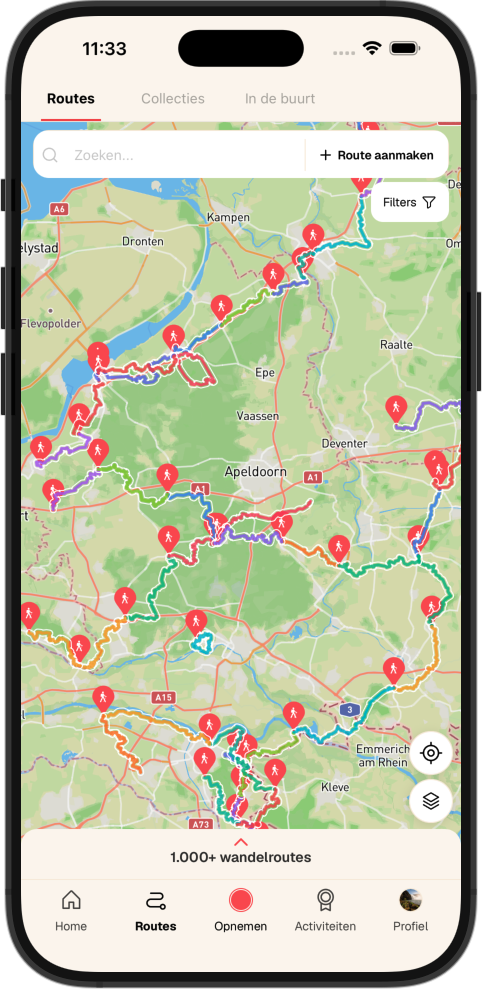
Five fixed tabs at the bottom: Home (feed), Routes (discover), Record (start straight away), Activities (challenges and events) and Profile.
Discovering routes (map and list)
Explore routes on the map and in lists, with filters including:
- Distance.
- Percentage paved and unpaved (and related surface info).
- Minimum rating (stars).
- Circular route or A to B.
- Wheelchair and stroller accessibility.
- Whether dogs are allowed.
- Difficulty.
Information per route
Each route can show:
- Estimated duration and route shape (e.g. loop or point-to-point).
- Paved and unpaved (percentages or summary).
- Climb and descent with an elevation profile.
- Surface type / footing.
- Weather forecast where shown.
- Plus descriptions, photos, reviews and practical tips where available.
Route collections
Collections bundle routes that belong together — stages of a long trail (e.g. Pieterpad) or your own sets. Anyone can create collections; keep them private or share publicly.
Creating and improving routes
You can add routes in several ways:
- Route Maker — draw your own route on the map.
- Route Generator — from a start point and desired distance, generate a route along walking paths.
- GPX upload — import an existing track.
- Record a walk and submit that recording as a route or proposal.
- Junction networks — build a route along junction nodes on the map.
- Improve routes: report what is wrong and what it should be; update coordinates for detours or outdated paths (via WandelWeb’s workflows).
Walking diary: completed routes
Mark routes as completed for a personal walking diary; filter views (e.g. only finished routes).
Share, download and connect
- Share a route with others.
- Download GPX.
- Save offline for use without internet.
- Send the route to Garmin for on-device navigation (where included in your subscription).
- Create a new route from an existing one (variant or tweak).
On the map: follow, navigate and record
With a route on the map you can:
- View the route and walk it.
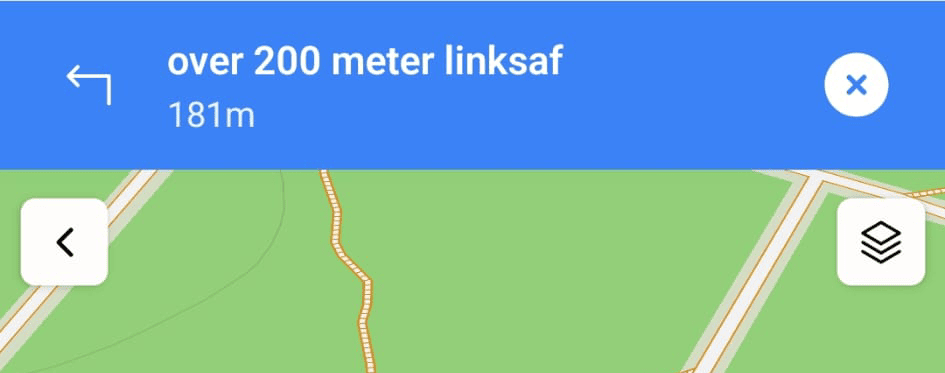
- Use spoken turn-by-turn guidance or only a location “puck” to see if you stay on the line.
- Reverse the route (A→B becomes B→A).
- Route monitoring: get a notification when you leave the trace.
- Record your walk while following the route.
- Share live location with people you allow.
- Without picking a route first: the record screen offers the same map, POIs, recording and navigation aids — great for a free-form walk.
Map: practical POIs
- Benches, drinking water, toilets.
- Food and drink, places to stay.
- Public transport stops.
- Submit corrections or additions when something is wrong.
Map: culture, nature and history
Historical, cultural and nature POIs with background text and sometimes photos — learn about the area as you walk.
Highlights
Points users can add and see: tips, parking, stamp posts at events, or historic spots with extra context — richer than the route line alone.
Home and feed
The feed focuses on information and inspiration — what others share about walking.
- Recorded walks from other users.
- Route reviews.
- Photos people add to walks or routes.
- Shared events.
- Group posts from communities you belong to.
- Entry to search and, where relevant, news or important notices from WandelWeb (e.g. safety or routes).
Groups
Groups are small communities inside WandelWeb. Members can create them — for a fixed club, specific topics (like transport) or to find walking buddies. Join, see members and posts, manage invitations.
Profile
- Photos, bio and links (e.g. your link-in-bio page).
- Follow others and see followers.
- Quick view of routes you created and routes you saved.
- Manage who you share live location with.
- Activity statistics.
- Your content: recordings, reviews, photos, completed routes, badges and other achievements.
Chat
Message other users directly; end-to-end encrypted and built with safety in mind. Send and accept invitations; block users when needed.
Challenges and events
Join challenges — sometimes with code redemption, calendars and group angles. Join events or create your own; ties into the feed and groups.
Organisations
Bulk subscriptions for staff or members at a strong discount. Manage the organisation and run your own challenges to keep people engaged.
Garmin
Connect your Garmin device via Garmin Connect: sync activities, visibility preferences, import history where available, send routes to the device for navigation (depending on subscription).
News, FAQ and notifications
- News from WandelWeb.
- FAQ with common questions.
- Overview of your notifications in the app.
Contact and support
Reach the developer or team for questions, feedback or general support.
Settings
- Dark mode.
- Preferred language (Dutch / English).
- Push notifications on or off and per type.
- Route monitoring (sensitivity / behaviour).
- Navigation voice on or off.
- Link account to Garmin or SSO (Google, Facebook, Apple) where supported.
Subscription and premium
Part of the product is subscription-based. The app shows what premium includes; view, start or manage your subscription.
Account
- Sign up and sign in with email and password, including email verification where required.
- Sign in with Apple, Google or Facebook (SSO).
- Redeem codes for challenges, campaigns or organisation invites.
WandelWeb keeps evolving; not every detail is listed here — but this shows how much sits in one place.